
Syllabus Management Software for Schools.
Keep your school's syllabus organized, structured and ready for teaching with Ellifo. Create a digital syllabus library, arrange learning content into units, chapters and topics, and assign syllabi to the right classes, subjects and academic years.
Give teachers a structured curriculum to work with and make it easier to connect syllabus content with lesson planning.
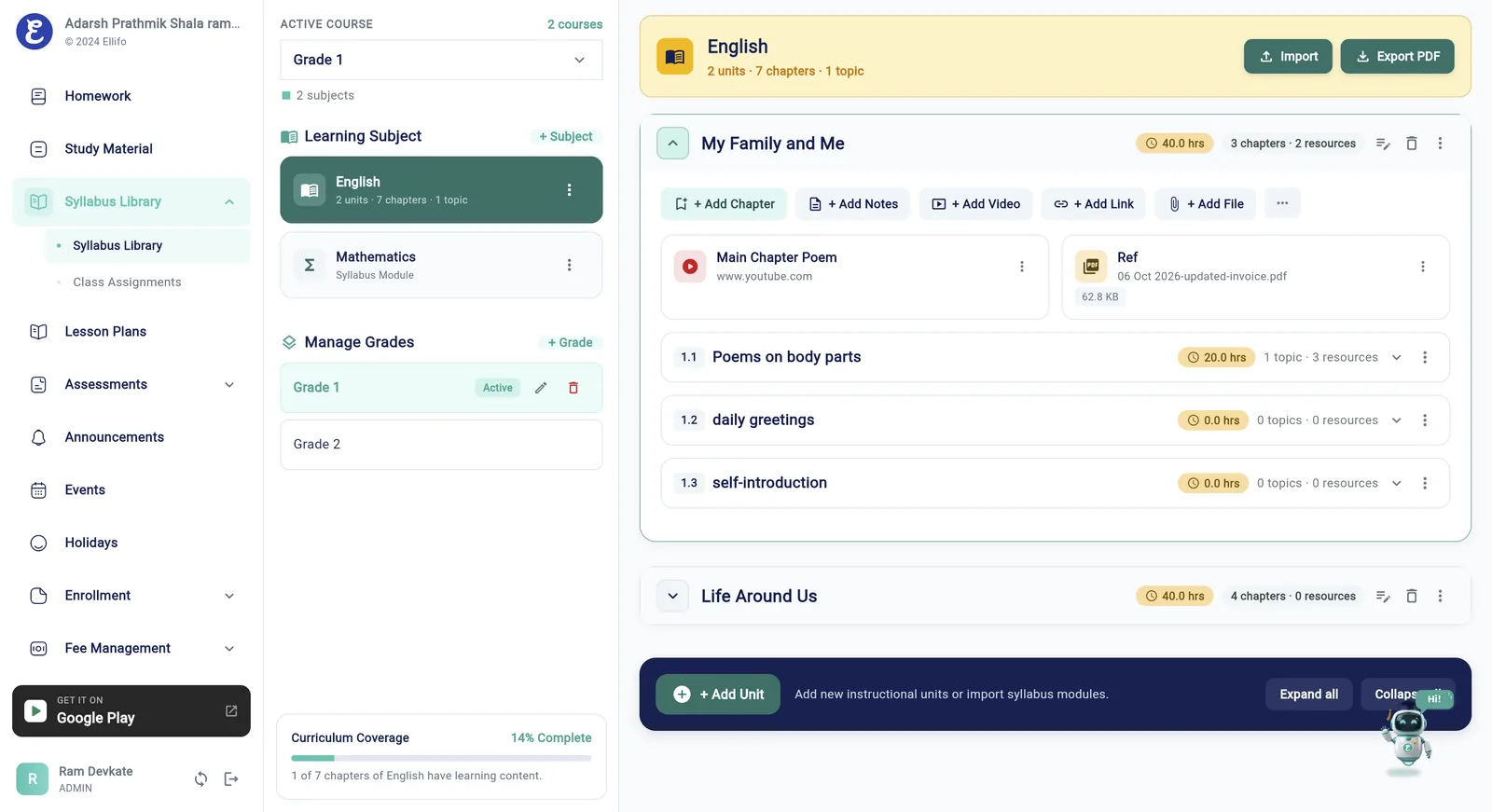

Bring Your School's Syllabus into One Organized Library
Managing a syllabus across classes, subjects and academic years can become difficult when information is spread across documents, spreadsheets and separate files.
Ellifo's syllabus management software gives your school a structured digital library for organizing curriculum content. Keep syllabus information arranged in a consistent hierarchy and make relevant content available for academic planning.
Whether your teachers are preparing lessons, reviewing chapters or selecting topics to teach, an organized syllabus provides a common academic reference for the school.
Organize Syllabus Content from Units to Topics.
Create a clear structure for your curriculum with syllabus items arranged into units, chapters and topics.
Units
Group related curriculum areas into larger sections.
Chapters
Organize each unit into manageable chapters.
Topics
Break chapters into specific topics teachers can use for lesson planning.
This hierarchy makes curriculum content easier to navigate and provides a useful foundation for planning individual lessons.
Reuse Syllabus Content Across Academic Years.
Build a reusable syllabus library instead of treating every academic year as an entirely separate starting point.
Ellifo separates the syllabus library from its class, subject and academic-year assignments. This allows schools to reuse suitable syllabus content and manage assignments for the relevant academic year.
When a new academic year begins, schools can carry forward suitable mappings and make the required changes without rebuilding the entire library from scratch.
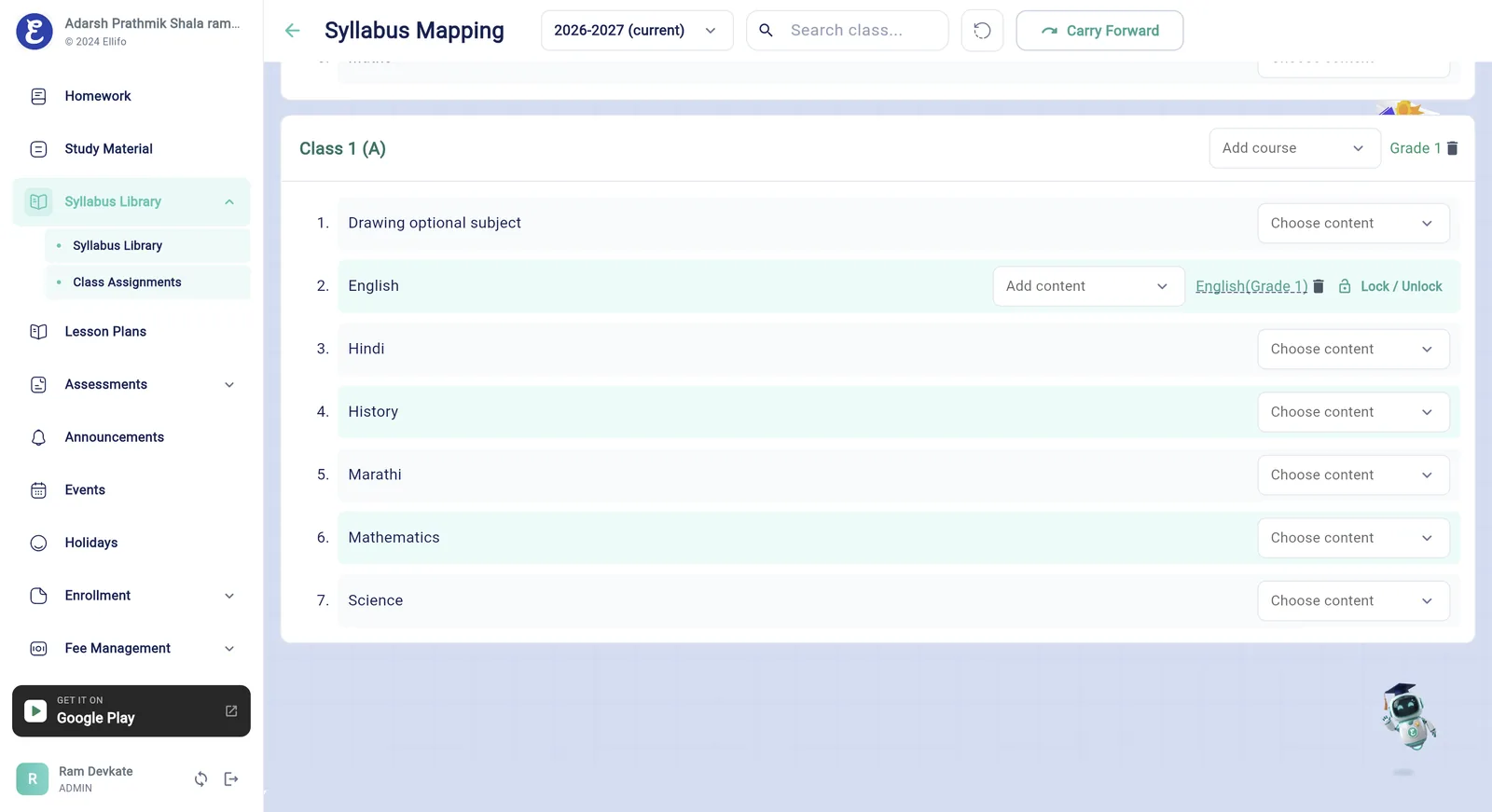
A Reusable Academic Resource
Add Notes, Learning Materials and References.
A syllabus can be more than a list of chapter names. Organize supporting resources alongside the relevant curriculum content. Depending on the content type, Ellifo supports:
Notes and Explanations
Rich-text learning content and introductions.
Examples and Summaries
Key points and revision material.
Video Resources
YouTube videos and video links.
Attachments and Links
Supporting documents and references.
Add relevant content to the appropriate syllabus item to make it easier to find when preparing or delivering lessons.
Connect Syllabus Management with Lesson Planning.
A structured syllabus becomes more useful when teachers can use it to plan their teaching. With Ellifo, teachers can create lesson plans linked to syllabus chapters and topics. They can select multiple relevant syllabus items for a lesson or create a plan without a syllabus attachment when they need more flexibility.
Build the Library
Create units, chapters and topics and add notes, videos and attachments to them.
Map to Classes
Assign syllabus content to an academic year, class or standard, and subject.
Plan Lessons
Teachers link one or more chapters and topics to a lesson plan, or plan without one.
Share with Learners
Unlock selected units and chapters for students and parents when the school is ready.
This connects the curriculum structure with day-to-day teaching plans without forcing every lesson into the same workflow.
Manage Syllabus Access with More Control.
Schools need flexibility in how curriculum content is prepared, updated and shared.
Mapping Management
Ellifo supports syllabus mapping management, content ordering and mapping-specific changes, so each class assignment can be adjusted without changing the library itself.
Unlock for Students & Parents
Unlock functionality allows staff to control which supported units and chapters are made available to students and parents, while staff can access the full syllabus content according to the intended workflow.
This helps schools manage the difference between maintaining curriculum content and deciding when selected content should be available to learners.
Who Can Benefit from Syllabus Management Software?
School Administrators & Academic Coordinators
Maintain a structured syllabus library and manage class, subject and academic-year assignments.
Teachers
Find syllabus topics and supporting materials when preparing lesson plans.
Students & Parents
Access syllabus content that the school has made available to them, helping them understand the material being covered.
Works with Other Ellifo Modules
Study Material
Share notes, worksheets and reference links by class and subject.
Homework Management
Assign, collect and track homework online with students and parents.
Lesson Plans
Plan lessons from syllabus topics and record what was covered in class.
Frequently Asked Questions About Syllabus Management Software.
Everything academic leaders, teachers and parents need to know about the Ellifo syllabus library.
